
Governix for Confluence - User Guide
Quick Start (≈3 minutes)
- Command Center: Review Instance Health, Risk Signals, and governance summaries.
- Spaces: Identify inactive spaces, attachment growth, and template sprawl.
- Pages: Identify stale, orphaned, archived, and trashed content.
- Lifecycle Governance: Archive outdated content and clean up orphaned pages.
- Playbooks: Establish ongoing governance and cleanup practices.
On This Page
- Command Center
- Rovo Governance Copilot
- Spaces
- Pages
- Governance Playbooks
🧭 Command Center
Command Center Overview
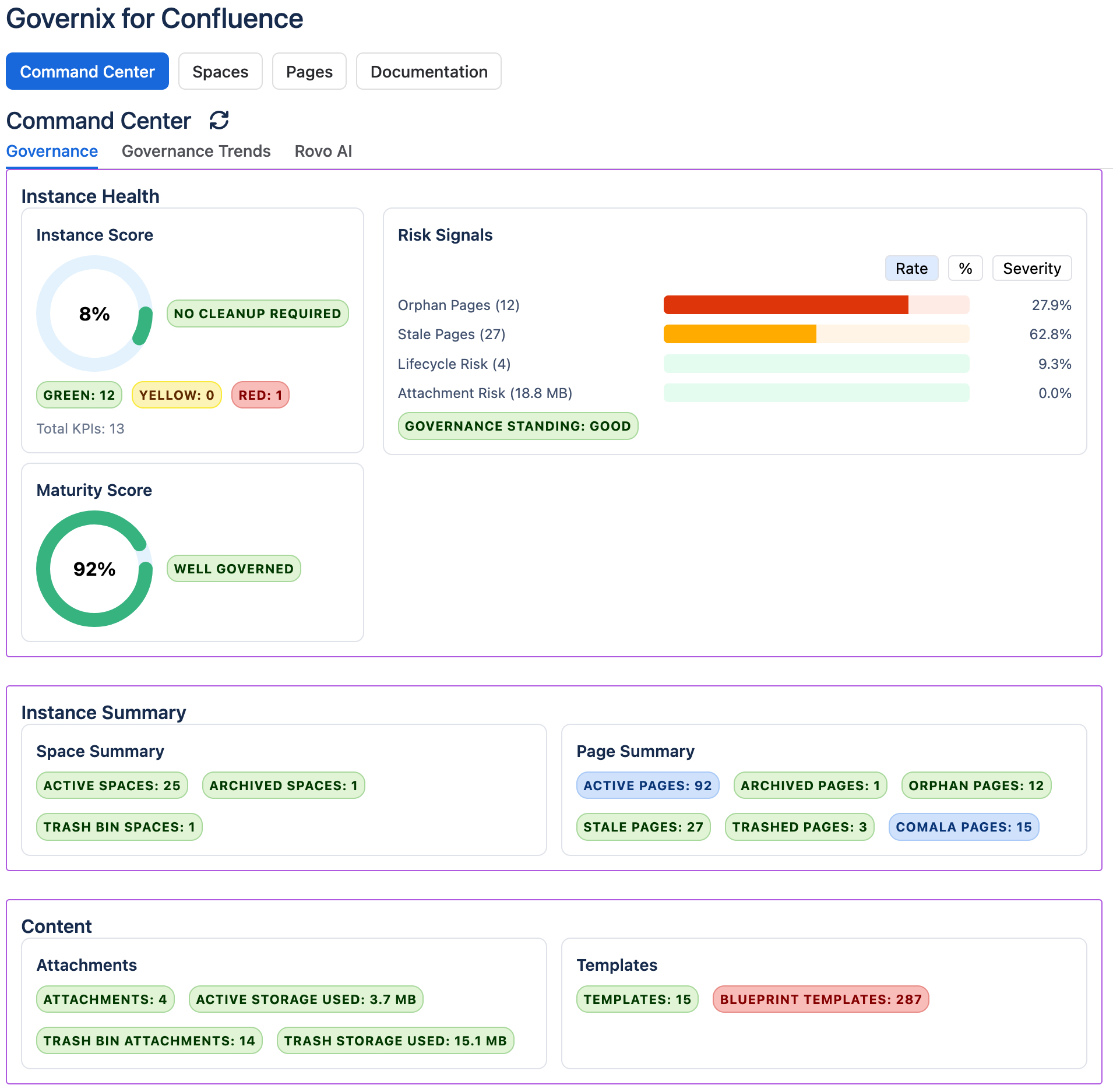
Audience: Confluence Administrators, Governance Leaders
Why this matters: Provides a centralized view of Confluence governance posture, content lifecycle health, attachment growth, and overall instance maturity.
Scope
- Instance Health
- Risk Signals
- Space Summary
- Page Summary
- Attachment Summary
- Template Summary
- Governance Trends
How to Use
- Review your Instance Score and Maturity Score.
- Review governance risk signals.
- Identify high-risk areas requiring attention.
- Monitor page lifecycle indicators including stale, orphaned, archived, and trashed content.
- Monitor attachment storage growth.
- Use summary cards to determine governance priorities.
- Open the Governance Trends tab to review governance changes over time.
- Monitor risk signal movement, content growth, and storage growth.
- Measure the impact of governance initiatives using historical snapshots.
Benefits
- Single pane of glass for Confluence governance.
- Improved visibility into content lifecycle health.
- Improved documentation quality.
- Reduce stale and orphaned content.
- Better visibility into storage consumption.
- Track governance posture over time using Governance Trends.
- Measure the success of cleanup and governance initiatives.
- Monitor governance maturity evolution through historical snapshots.
🤖 Rovo Governance Copilot
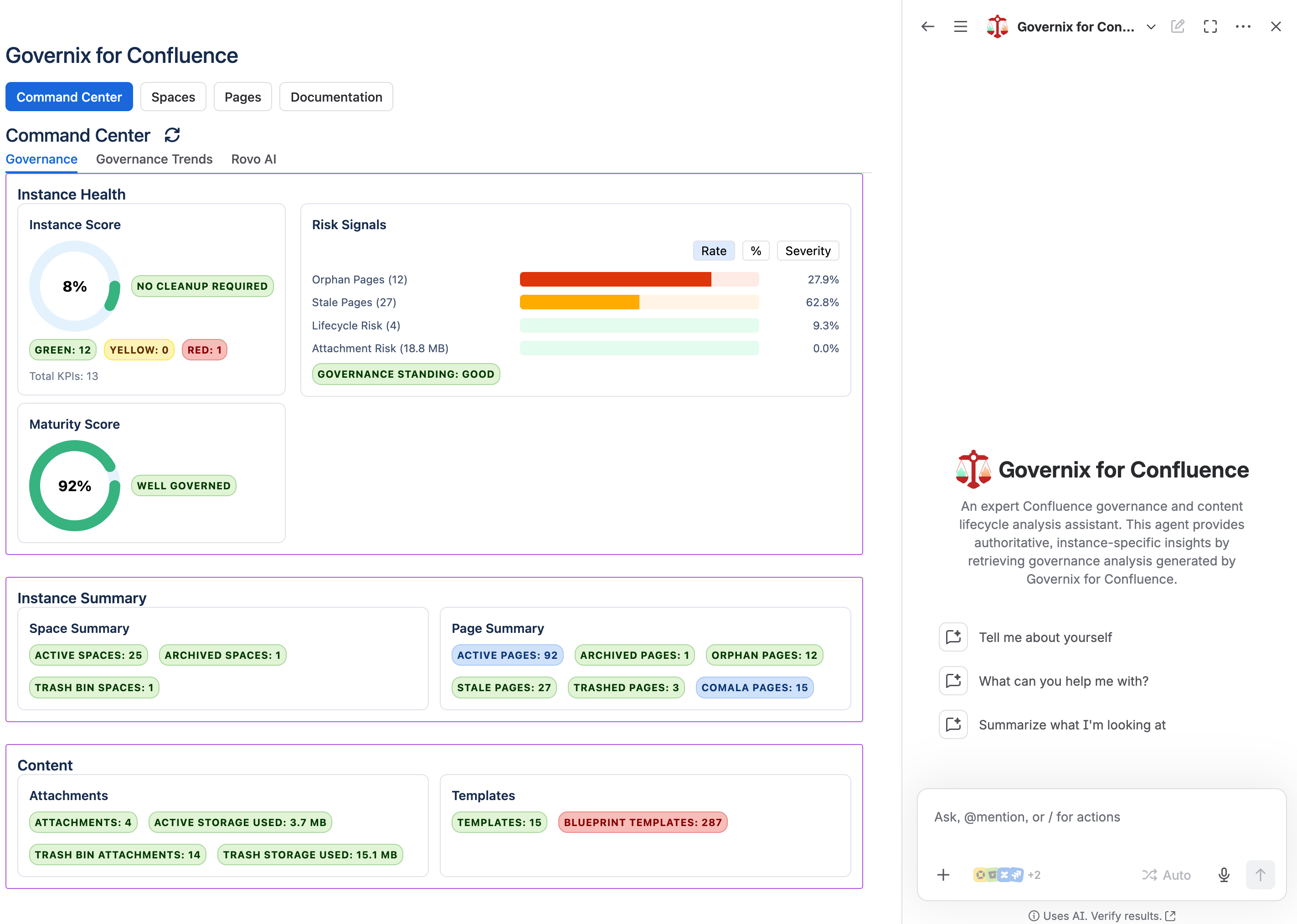
Audience: Confluence Administrators, Content Owners, Governance Leaders
Why this matters: Convert governance data into actionable intelligence, governance documentation, Jira Epics, Jira Stories, and governance initiatives using Atlassian Rovo, Governix analysis, and RenWare governance guidance.
Scope
- Governance Analysis
- Governance Trends
- Decision Intelligence
- Executive Intelligence
- Scenario Intelligence
- Impact Intelligence
- Narrative Intelligence
- Transformation Intelligence
- Jira Work Item Creation
- Confluence Governance Pages
How to Use
- Open Ask Rovo from the Confluence navigation.
- Select Governix for Confluence.
- Ask governance questions using Command Center data.
- Generate governance pages, Jira Epics, and Stories.
- Link Jira work items to governance pages.
- Review governance trends and intelligence layers.
Example Prompts
- What are my current risk signals?
- What is my current Instance Score and Maturity Score?
- What is my Primary Decision?
- Create a Cleanup Epic using your previous response and generate a Story for each bullet.
- Create a detailed Audit governance page.
- Append the Jira section of the active governance page with Epic ABC9-10.
- Make ABC9-10 the parent Epic for ABC9-11.
- Create a Reporting Epic and generate Stories from your recommendations.
Benefits
- Add meaning and narrative to governance data.
- Create governance documentation on demand.
- Create Jira Epics and Stories directly from governance findings.
- Generate Audit, Cleanup, Prevention, Remediation, and Reporting initiatives.
- Reduce time spent manually writing reports and action plans.
- Connect governance intelligence directly to execution.
- Follow governance trends unique to your environment.
🏢 Spaces
Spaces Overview
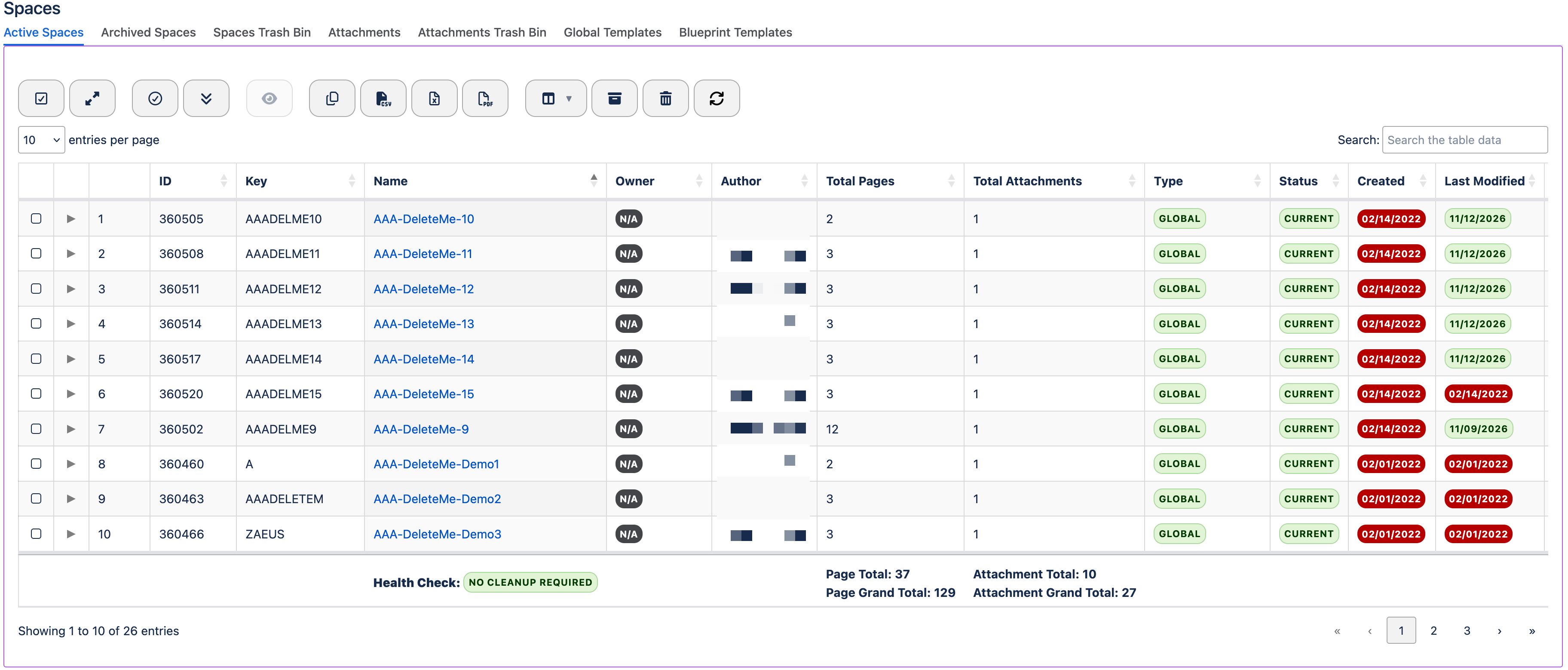
Audience: Confluence Administrators, Space Owners
Why this matters: Spaces represent the primary organizational structure within Confluence. Effective governance reduces sprawl and improves maintainability.
Scope
- Active Spaces
- Archived Spaces
- Spaces Trash Bin
- Attachments
- Attachments Trash Bin
- Global Templates
- Blueprint Templates
How to Use
- Review active spaces for ownership and governance.
- Archive inactive spaces where appropriate.
- Monitor attachment growth and storage usage.
- Identify attachment cleanup opportunities.
- Review global and blueprint templates.
- Remove unnecessary content from attachment trash.
Benefits
- Reduces space sprawl.
- Improves governance visibility.
- Controls storage growth.
- Improves template standardization.
📄 Pages
Pages Overview
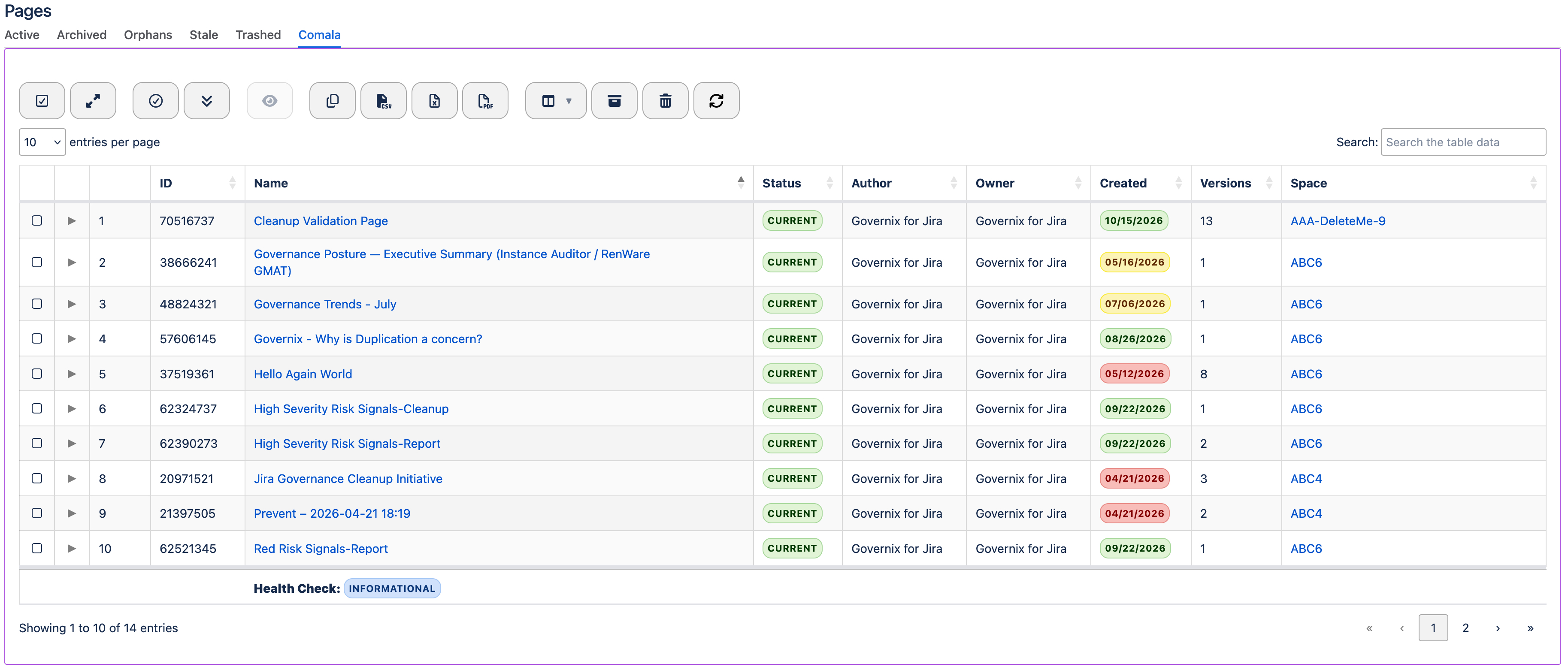
Audience: Confluence Administrators, Content Owners
Why this matters: Content lifecycle governance helps ensure that documentation remains accurate, discoverable, and relevant.
Scope
- Active Pages
- Archived Pages
- Orphan Pages
- Stale Pages
- Trashed Pages
- Comala Pages
How to Use
- Review orphan pages that lack proper placement.
- Review stale pages that may require updates.
- Archive outdated content.
- Permanently remove content that is no longer needed.
- Monitor Comala-managed content requiring workflow governance.
Benefits
- Improved documentation quality.
- Better search relevance.
- Reduced information debt.
- Improved lifecycle governance.
📘 Governance Playbooks
Audience: Governance Leaders, Confluence Administrators
Why this matters: Establish repeatable governance practices that keep Confluence healthy, organized, and scalable.
Scope
- Content Lifecycle Management
- Information Architecture
- Space Governance
Content Lifecycle Management
Administrator Steps:
- Review stale pages monthly.
- Archive completed documentation.
- Review and purge trash content periodically.
- Review Comala workflow content.
Business Value: Improves content quality and user trust while reducing information debt.
Information Architecture
Administrator Steps:
- Review orphan pages monthly.
- Review page hierarchy.
- Correct misplaced content.
- Ensure content ownership remains current.
Business Value: Improves discoverability and navigation across the platform.
Space Governance
Administrator Steps:
- Review inactive spaces quarterly.
- Monitor attachment growth.
- Review templates and blueprint usage.
- Archive unused spaces.
Business Value: Reduces administration costs and improves platform maintainability.